|
|

Joined:
September 2003
Posts: 9301
Location: south east Michigan | First of all and huge thank you goes out to 2fibyc. He read how I hope to get one someday and offered to let me test drive his for a few weeks. What a guy!
His only condition was that I give it a full review here on the board.
There is still a lot to learn about the settings. I had a major feedback problem that I have not figured out yet. Basicly, I spent an hour or so pushing buttons to see what happens. Here's what I've found out so far.
1) It's a neat little tool. There is a faint taste of "robo-voice" in the harmonys but it's acceptable.
2) For the most part, should be used sparingly except for a song like "Surfer Girl".
3) You can mix the main and the harmonys to any percentage. Turn the harmony all the way up and the main vocal cannot be heard.
4)The machine somehow reads the guitar chords you are playing to run the harmony. However.... if you want accapella you can turn down the guitar signal so it does not go beyond the box. If you suddenly mute the strings it will hold true for a few words or a short phrase before falling off into glorious dischord.
5) With the right settings, it sends out some nice harmonys. The wrong setting had my wife cringing.
6) THE MOST IMPORTANT thing I learned... There is no place to hide. If you hit a note that's just a little off, the whole damn choir follows you right off the cliff.
I'll post more as I learn more. |
|
| |
|
Joined:
March 2002
Posts: 14842
Location: NJ | ". . If you suddenly mute the strings it will hold true for a few words or a short phrase before falling off into glorious dischord. . ."
Try doing the opposite.
Strum a chord at the beginning of the accapella passage and just let it "ring" while you're singing . . . see if that buys you more "time" . . .
I'm a bit curious about these units. |
|
| |
|

Joined:
December 2005
Posts: 1234
Location: Tidal Mudflats of Virginia | I've only got a chance to play around with mine a couple times. I have learned that instead of one voice that can't sing, there are now three of us killing cats and terrorizing the neighborhood! |
|
| |
|
Joined:
September 2003
Posts: 9301
Location: south east Michigan | Cliff... I'll give it a try & let you know. I'll also see if it can read a single note G as well as a G chord.
I think this would work for you. Going from a duo to a solo act has to feel like there is something missing. I know when I practice without Brian it sounds very thin in comparison.
This was pretty cool. There is a part in "You Were Always On My Mind" where one vocal note is held through a chord change. When the chord changes, so does the harmony while the lead note stays the same.
This thing could use a remote foot switch. It's hard to change the harmony settings with your toes. It would be nice to have those control within reach to change between songs. |
|
| |
|
Joined:
March 2002
Posts: 14842
Location: NJ | ". . Going from a duo to a solo act has to feel like there is something missing . ."
You've obviously never seen Rick & I perform together . . . |
|
| |
|

Joined:
December 2004
Posts: 4394
Location: East Tennessee | Originally posted by Slipkid:
It's hard to change the harmony settings with your toes. Try playing the guitar with your toes. :D
These things are cool. I have an older generation model.
Like most things they can add to a performance when used sparingly. Like Reverb & Chorus. If a little is good, more is not always better.
Thanks for the report. If I thought I would use it more, I'd upgrade mine to a newer model. |
|
| |
|
Joined:
January 2004
Posts: 1225
Location: Lake Hiawatha, New Jersey | Originally posted by cliff:
I'm a bit curious about these units. You're welcome to use mine.
I find it to be useful if used sparingly, and on the right songs. I've had a lot of positive feedback at gigs. At the very least, you can have a lot of fun with it. |
|
| |
|
Joined:
December 2006
Posts: 6268
Location: Florida Central Gulf Coast | Originally posted by cliff:
I'm a bit curious about these units. cliff,
If ya want, when Brad gets a feel for the unit, he can send it to ya to try out. Since I don't plan on using it in the near future, it might as well be 'on the road' a few more weeks for you to evaluate also. |
|
| |
|
Joined:
December 2003
Posts: 13997
Location: Upper Left USA | Its a lot more fun to sing with a pretty girl... |
|
| |
|
Joined:
December 2001
Posts: 7251
Location: The Great Pacific Northwest | I have an older generation model as well.
Another use I have seen mention is to monitor "in pitch". Sometimes helpful live, where you don't really add any "affect" but just pipe a "pitch corrected" signal of your voice back through the monitors. Helps you sing on key when things get too loud to really hear anything. Doesn't always work, but when it does, it's helpful.
Use sparingly is a good term. Remember when you are singing along, if you clearly hear the backups from the Digitech, it's probably too high in the mix.
Make test recordings.. just a mic in the room is fine, to hear when the best "mix" level is. Do not rely on singing and setting the level to match your voice level. Most of the time, it need not be higher than about 20-50% to be quite impressive.
One area it shines is for "doubling". Mine has a randomize so it really just sounds like I'm singing along with myself. There's no real pitch changing so little to no "robo" sound. Just more voice. Like all those 80's rock records without having to go through the effort of recording your own voice three times... which live... would be difficult. |
|
| |
|
Joined:
May 2005
Posts: 486
Location: North Carolina | A few thoughts:
Couple of volume pedals are helpful-
1- Put one between the guitar output of the box and your mixer. This will allow you to mute the guitar in the PA yet send a signal to the harmonizer for the acapella parts.
2- Put another between the vocal output of the box and your mixer. Isolating the harmonies is a good idea; running them through a volume pedal allows you introduce and remove them to and from the mix more smoothly, and allows you to correct if they're too hot. More importantly, you can get the harmonizer off the floor so you can more easily change the settings between songs and look let dorky doing it.
If you have several vocalists and want each to use the box in different songs, you can assign different mics to the box by using the line-in fed by one of your aux sends from your board. You can now send each person's channel to the harmonizer at will, then take the harmonized signal back on another channel.
You do have to be careful the mic/line input is not set too hot, it might result in distortion and/or feedback. If you get a buzz check the ground lift, it does help.
I don't use the guitar fx at all. |
|
| |
|
Joined:
May 2005
Posts: 486
Location: North Carolina | Originally posted by Mr. Ovation:
Another use I have seen mention is to monitor "in pitch". Sometimes helpful live, where you don't really add any "affect" but just pipe a "pitch corrected" signal of your voice back through the monitors. Helps you sing on key when things get too loud to really hear anything. I'm curious about that. In another project I was involved with, there was a singer who had terrible pitch problems. I explored the idea of live pitch correction, but was told that it only confuses the singer. You say it's worked for you? |
|
| |
|
Joined:
December 2001
Posts: 7251
Location: The Great Pacific Northwest | Well if they already can't hit the note, this ain't gonna help.
We had several tunes that involved a sequence going and there were a couple of parts I didn't have a "musical" reference so we sent the notes via midi to the Digitech to control pitch. I could already sing the part, it just helped me stay on key to hear my own voice, in pitch, to sing to.
But if someone can't sing along and stay in pitch, this certainly won't help. |
|
| |
|
Joined:
September 2003
Posts: 9301
Location: south east Michigan | I set up the amps & mics out on the deck yesterday. BrianT and I got in a good 3 hour practice before the sun came around and chased us off.
The Harmonizer worked great. When used sparingly, it filled out the vocals nicely. When Brian was singing a low harmony, I set the machine for a high one. It really shined on Two Of Us, Mrs. Robinson, and the chorus of Get Together.
It's hard for me to hear the full effect when I'm singing but Brian was very impressed with it. We always wondered what a third voice would do for our sound.
At a point Brian looked over at me, bottom lip quivering and said "You don't need me anymore!"
That's definatly not true because as well as it does work, it's not a good as having another human singing with you. I'd say that it sounds natural 95% of the time and the rest can sound noticably processed. But then again, that just might be me. It uses a built in tuner to read what the guitar is playing and what note you are singing. I might be a few cents off and the machine is just followinging me right off the cliff.
At this point I'd say that as long as you set it up right and you keep it on a short leash, its a real asset.
The experiment continues. |
|
| |
|
Joined:
October 2006
Posts: 5576
Location: big island | brad/brian,
how's about filming a song or three using the harmonizer and posting it on youtube for us? |
|
| |
|
Joined:
September 2003
Posts: 9301
Location: south east Michigan | Good idea.
I just have to figure how how to do it.
Cliff...
I read in the manual and experience tells be that the magic box "remembers" a chord pattern for 30 seconds.
It also suggests that if you want to jump right into the next song to strum a few chords to get the box on the same page. |
|
| |
|
Joined:
December 2004
Posts: 4394
Location: East Tennessee | Originally posted by Slipkid:
Cliff...
I read in the manual and experience tells be that the magic box "remembers" a chord pattern for 30 seconds. That's about my limit also. :D
I saw a guy do "All The Gold In California" He nailed it. When mixed right it was cool. |
|
| |
|
Joined:
October 2005
Posts: 5332
Location: Bluffton, SC | :D :D |
|
| |
|
Joined:
December 2006
Posts: 6268
Location: Florida Central Gulf Coast | Brad,
Besides a review, you gotta do a 'take' or two or three! Then you can teach me the settings. No way you can teach me to sing... |
|
| |
|
Joined:
September 2003
Posts: 9301
Location: south east Michigan | My song for the Members Night Out Disc uses the little magic box.
I'll see what I can do about some short demos.
Then I need to find one of those hosting websites for mp3 clips.
That first day I was trying it I was jumping from song to song pretty fast. I might not have given the box a chance to get on the same page and that might have accounted for some sour harmonies. |
|
| |
|
Joined:
September 2003
Posts: 9301
Location: south east Michigan | Not that I'm really happy with it, I just downloaded "Elenor" to the mp3 player on the new site.
I'm trying to not be fussy and it shows.
I just want to get a few samples up on the board before I send it back.
Go to the mp3 player at the bottom right of the main page. I should be the among the top of the list until some else downloads something and moves it down. |
|
| |
|
Joined:
December 2005
Posts: 1234
Location: Tidal Mudflats of Virginia | I figure I broke even with the free DA-5 microphone offer when I got mine...It's gonna take a lot more than the magic box to fix the sound of my voice :)
Brad,
Have you tried using the box inline with the UX2? |
|
| |
|
Joined:
December 2006
Posts: 6268
Location: Florida Central Gulf Coast | Originally posted by Tim in Tidewater:
I figure I broke even with the free DA-5 microphone offer when I got mine...It's gonna take a lot more than the magic box to fix the sound of my voice That was a sweet(water) deal! Yepper, magic boxes won't help me but the idea of having a 'digital' partner for any of the G-babies was too enticing.
Brad, since I'm heading down to the Keys for the lobster seasons, why don't ya hold onto the unit for another month. I really enjoyed your 'Elenor'. Sounds as though you're starting to get the hang of the box.
BTW, some of you b@st@rds really make me feel soooo inadequate! Great job...  |
|
| |
|
Joined:
September 2003
Posts: 9301
Location: south east Michigan | Tim... Yep... I run the magic box right into the Line 6 interface.
And Tim... good job on your songs.
Keep it up.
Iffy... thanks again. |
|
| |
|
Joined:
September 2003
Posts: 9301
Location: south east Michigan | There is a much more in depth discussion about these machines HERE.
The VL4 model might be worth the extra bucks.
Of course I could always wait for the VL8 version. That one will probably have Sheryl Crow singing backup for ya. |
|
| |
|
Joined:
September 2003
Posts: 9301
Location: south east Michigan | Well, I gotta send this thing back pretty soon now.
I did a demo track and downloaded it on the "new" site.
No do-overs. This will show you what happens when you hit a bum note.
Look at the playlist on the main page under "Harmonizer Demo". After it get gets bumped off that you can find it on my homepage. |
|
| |
|
Joined:
March 2002
Posts: 14842
Location: NJ | WellDone, Brad.
I sat-in w/JohnB last night as his de-facto "rhythm-track" on the cajon and some background vocals.
This was my first experience hearing one of these units used in a live application.
Used judiciously, they work pretty well.
We were even able to "pull-off" a version of "JudyBlueEyes" that wasn't anywhere NEAR the "TrainWreck" that I had initially anticipated it was going t'be . . .
NiceLilUnit. |
|
| |
|
Joined:
January 2007
Posts: 430
Location: WNC-God's Country | I love my VL4....No drug problems, no ego, and always shows up for rehersal!! |
|
| |
|
Joined:
September 2003
Posts: 9301
Location: south east Michigan | Thanks Cliff.
I've found that few recordings I have done have turned out better than I had hoped for. And BrianT was real pleased with it the one practice we did.
One possible draw back, which I tried to demonstrate, is just how thin one voice sounds after singing the chourus with the box filling things out.
I'm test driving the VL2... from what I'm gathering the VL4 is worth the extra money if just for the preset features. |
|
| |
|
Joined:
January 2004
Posts: 1225
Location: Lake Hiawatha, New Jersey | Originally posted by cliff:
WellDone, Brad.
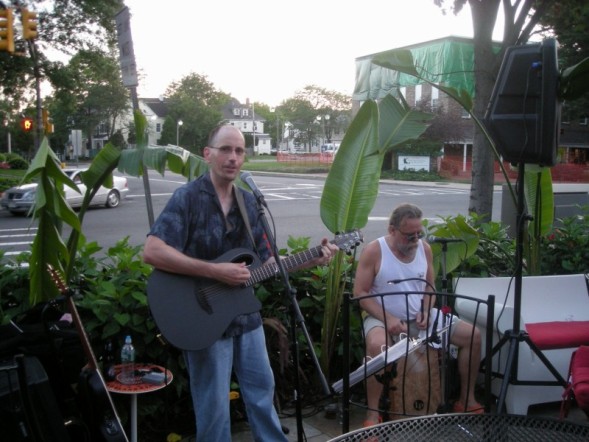
I sat-in w/JohnB last night as his de-facto "rhythm-track" on the cajon and some background vocals.
This was my first experience hearing one of these units used in a live application.
Used judiciously, they work pretty well.
We were even able to "pull-off" a version of "JudyBlueEyes" that wasn't anywhere NEAR the "TrainWreck" that I had initially anticipated it was going t'be . . .
NiceLilUnit. ...other than my TOTALLY screwing up one of the guitar parts.
It was a lot of fun. Of course, having Cliff around, there wasn't much need for the "Digitech".

 |
|
| |
|
Joined:
November 2003
Posts: 11039
Location: Earth·SolarSystem·LocalInterstellarCloud·Local Bub | Is that (top pic) Cliff's "He's totally screwing-up that guitar part" face? |
|
| |
|
Joined:
January 2004
Posts: 1225
Location: Lake Hiawatha, New Jersey | Originally posted by Jeff W.:
Is that (top pic) Cliff's "He's totally screwing-up that guitar part" face? Na...that's his "what the hell did I get myself into?" face. |
|
| |
|
Joined:
November 2003
Posts: 11039
Location: Earth·SolarSystem·LocalInterstellarCloud·Local Bub | yehh, yer right... they're similar, easy to confuse'm. |
|
| |
|
Joined:
May 2005
Posts: 486
Location: North Carolina | Originally posted by John B:
Originally posted by Jeff W.:
Na...that's his "what the hell did I get myself into?" face. |
|
| |
|
Joined:
November 2005
Posts: 1126
Location: Omaha, NE | Here's a totally over the top use of the VL4 that I was playing with the other night: Killing The Blues
In general, I'm in the "a little bit goes a long way" camp on these things, but I thought it would be fun to see what it could do with a complete duet approach. The results are better than I would have expected.
This might actually be workable live. No way it works for a recording, but that's something else anyway. |
|
| |
|

Joined:
April 2004
Posts: 13303
Location: Latitude 39.56819, Longitude -105.080066 | The problem I have with these units seems to be that they muddy up the vocals. The clarity is just not there.
The unit itself seems to be pretty cool and the harmonies are more than acceptable but it just doesn't sound clear.
By the way, nicely done Jeff....I just wish the vocals weren't muddy sounding. |
|
| |
|
Joined:
October 2006
Posts: 5576
Location: big island | sounds like another british pop invader group, jeff. |
|
| |
|
Joined:
January 2004
Posts: 1225
Location: Lake Hiawatha, New Jersey | Originally posted by stephent28:
The problem I have with these units seems to be that they muddy up the vocals. The clarity is just not there.
The unit itself seems to be pretty cool and the harmonies are more than acceptable but it just doesn't sound clear.
By the way, nicely done Jeff....I just wish the vocals weren't muddy sounding. I have found that I need to be very careful with the effects on the unit. The reverb is very touchy and you can easily go "overboard" on it. If you use too much reverb AND use the harmonizer effect, you end up with a very muddy sound. |
|
| |
|
Joined:
April 2004
Posts: 13303
Location: Latitude 39.56819, Longitude -105.080066 | Do you need the reverb or is it just to fill out the sound? |
|
| |
|
Joined:
January 2004
Posts: 1225
Location: Lake Hiawatha, New Jersey | Personally, I prefer to bypass the effects on the Digitech, and just use a touch of reverb from the mixer. Another thing that can effect the sound quality is the "mic gain" control. If that is set too high, the sound can distort when you sing louder. Using the harmonizer doubles (or triples)this unwanted effect as well. That said, it's not difficult to get a good sound when you experiment a bit. |
|
| |
 Digitech Vocal Harmonizer Review